Welcome to Flinkk One
Flinkk One is a comprehensive, multi-tenant CRM and customer support platform designed to streamline your sales pipeline, enhance customer relationships, and deliver exceptional support experiences—all in one unified system.
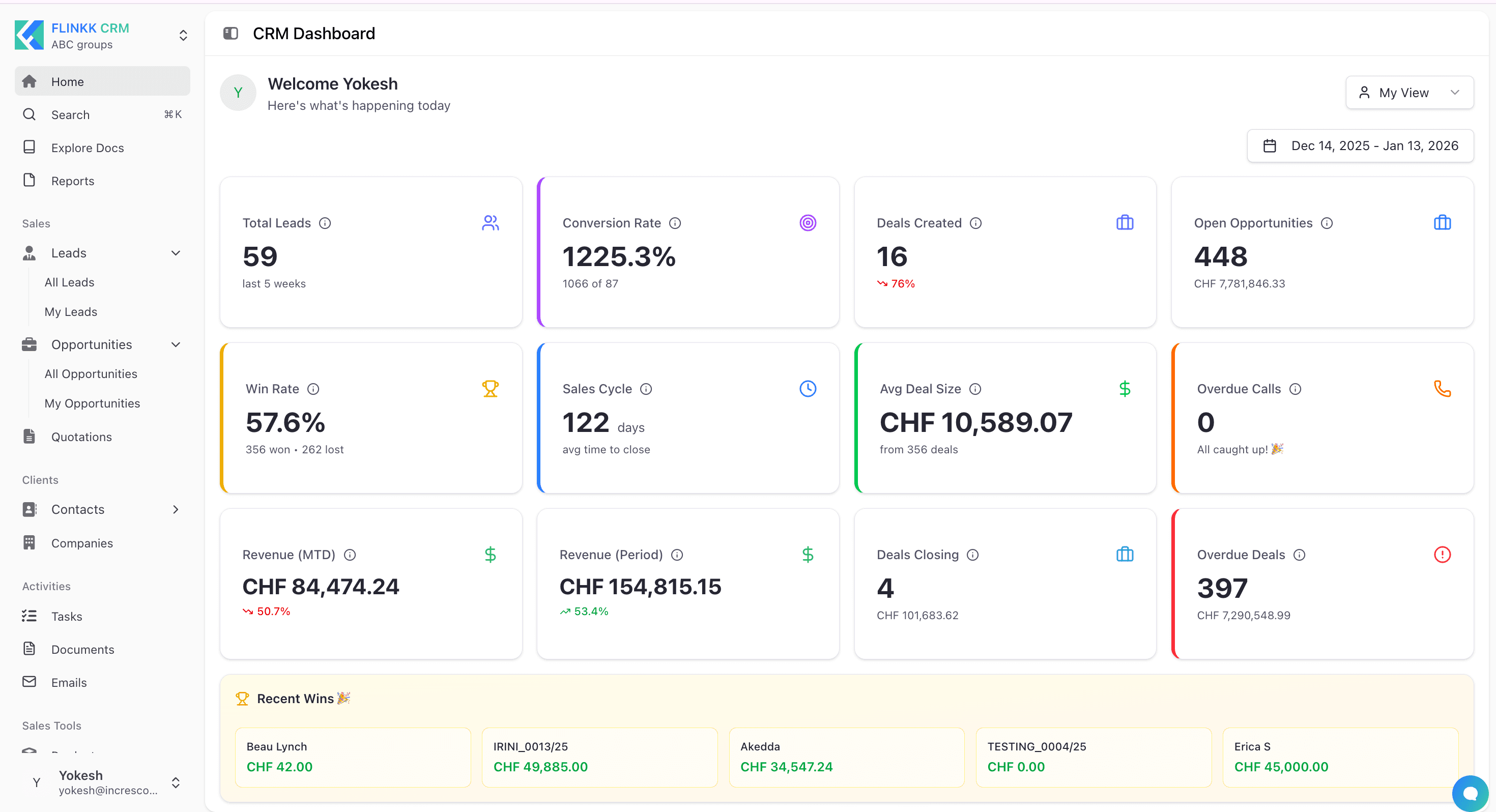
What is Flinkk One?
Flinkk One is an integrated business management platform that combines three powerful applications to help you run your entire customer-facing operations:
CRM Application
Manage your complete sales lifecycle from lead generation to deal closure. Track opportunities, create professional quotations, manage customer relationships, and maintain a comprehensive view of your sales pipeline with built-in analytics and reporting.
Support Application
Deliver exceptional customer support with a unified inbox, ticket management system, and built-in help portal. Handle customer conversations across multiple channels, track feature requests, manage product roadmaps, and build a comprehensive knowledge base—all from a single interface.
Admin Center
Configure and customize your Flinkk One instance to match your business processes. Manage team members, set up role-based permissions, customize fields and workflows, configure email templates, and integrate with external systems through APIs and webhooks.
Flinkk Assistant (AI-Powered)
Get instant help with an intelligent AI assistant that understands your sales workflow. Flinkk Assistant provides personalized guidance, answers questions, and helps streamline your daily tasks—available whenever you need it.
Why Choose Flinkk One?
Flinkk One brings together the essential tools your business needs to succeed:
Complete Sales Pipeline Management
- Lead Management: Capture, qualify, and nurture leads from multiple sources
- Opportunity Tracking: Monitor deals through customizable pipeline stages
- Quote Builder: Create professional quotations with packages, pricing breakdowns, and terms
- Contact & Company Management: Maintain comprehensive customer profiles with complete interaction history
Unified Customer Support
- Multi-Channel Inbox: Handle conversations from chat, email, and other channels in one place
- Ticket Management: Track, prioritize, and resolve customer issues efficiently
- Help Portal: Build and manage a self-service knowledge base
- Feature Management: Collect user feedback and manage your product roadmap
Enterprise-Ready Features
- Multi-Tenant Architecture: Manage multiple organizations from a single account
- Role-Based Access Control: Granular permissions for team members and departments
- Customizable Fields & Workflows: Adapt the system to your unique business processes
- Email Integration: Send and receive emails directly within the platform
- Multi-Currency Support: Handle international business with built-in currency management
- API & Webhooks: Integrate with your existing tools and automate workflows
-
- AI-Powered Assistant: Get instant help and personalized guidance from Flinkk Assistant
Team Collaboration
- Shared Workspace: Collaborate on deals, tickets, and customer interactions
- Activity Tracking: Monitor team activities and customer touchpoints
- Task Management: Assign and track tasks across your team
- Document Management: Store and share files with version control
Key Features
Sales & CRM
- Lead capture and qualification workflows
- Opportunity pipeline with drag-and-drop stages
- Professional quotation builder with package management
- Contact and company relationship mapping
- Sales forecasting and analytics
- Room availability and inventory management
Customer Support
- Unified inbox for all customer communications
- Ticket prioritization and SLA tracking
- Knowledge base and help portal builder
- Feature approval workflows
- Customer satisfaction tracking
- Support analytics and reporting
Administration & Customization
- Field-level customization for all modules
- Custom statuses, sources, and pipeline stages
- Email and quote template builder
- Team member and role management
- Currency and tax configuration
- API keys and webhook management
- File manager with organized storage
Integration & Automation
- RESTful API for custom integrations
- Webhook support for real-time notifications
- Email inbox integration (IMAP/SMTP)
- Calendar synchronization
- Import/export capabilities
Getting Started
Getting started with Flinkk One is quick and straightforward:
- Sign Up: Visit one.flinkk.io (opens in a new tab) and create your account
- Set Up Your Organization: Configure basic settings like currency, timezone, and business details
- Invite Your Team: Add team members and assign appropriate roles
- Customize Your Workspace: Set up custom fields, pipeline stages, and workflows
- Start Managing: Create your first lead, opportunity, or support ticket
For detailed step-by-step guidance, check out our Quickstart Guide which walks you through creating your first lead, converting it to an opportunity, and generating a quotation.
Learn More
Ready to dive deeper? Explore our comprehensive documentation:
Getting Started
- Quickstart Guide - Get up and running in minutes
- Core Concepts - Understand the fundamentals
CRM Documentation
- Leads - Capture and qualify potential customers
- Opportunities - Track deals through your pipeline
- Quotations - Create professional quotes
- Contacts - Manage customer relationships
- Companies - Organize accounts and hierarchies
- Tasks - Stay on top of activities
Support Documentation
- Support Dashboard - Monitor support metrics
- Tickets - Handle customer issues
- Conversations - Manage multi-channel communications
- Help Portal - Build your knowledge base
Admin Center
- General Settings - Configure your organization
- Members & Roles - Manage team access
- Field Customization - Tailor Flinkk to your needs
- Email Templates - Automate communications
- API & Webhooks - Integrate with external systems
Have questions? Need help? Visit our Help Portal (opens in a new tab) or contact our support team.