General Settings
Manage core organization information, branding, and business details for quotations and documents.
Overview
General Settings allows you to configure:
- Organization Information: Name, website domain, and logo for branding
- Regional Settings: Timezone for your organization
- Business Details: Legal business information used in quotations, invoices, and official documents
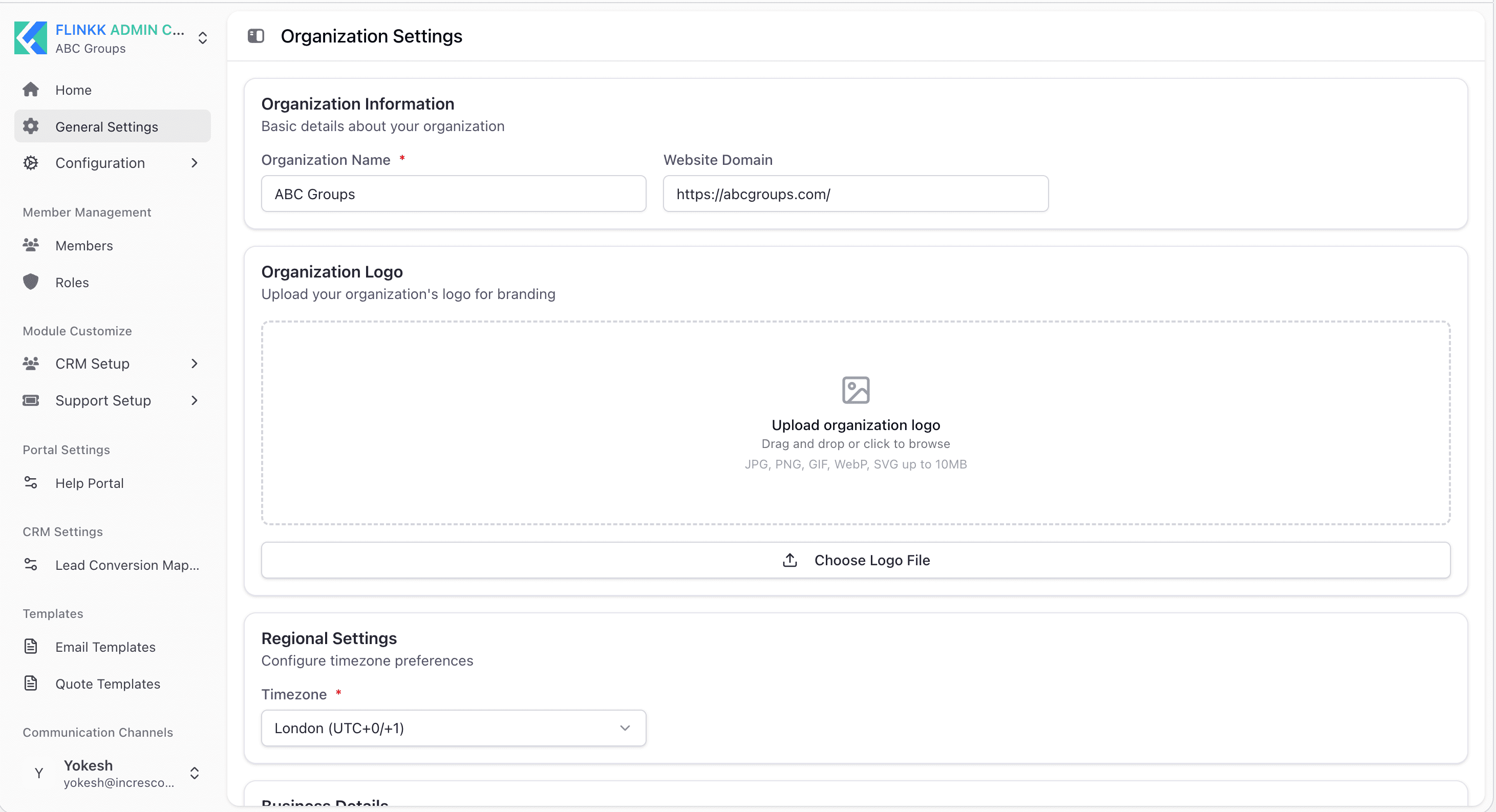
Organization Information
Manage your organization's basic profile information displayed throughout the system.
Fields:
-
Organization Name (required): Official name of your organization (e.g., "ABC Groups")
- Text field
- Displayed in system interface and branded documents
- Example: "ABC Groups"
-
Website Domain (optional): Your organization's website URL used for branding
- URL field
- Example: "https://abcgroups.com/ (opens in a new tab)"
- Used in customer-facing communications
-
Organization Logo: Upload company logo for branding
- Image upload field
- Supported formats: JPG, PNG, GIF, WebP, SVG (up to 10MB)
- Displayed in system interface and branded documents
- Click "Choose Logo File" button to upload
Regional Settings
Configure timezone preferences for your organization.
Fields:
- Timezone (required): Select your primary timezone for all system timestamps and scheduling
- Dropdown selection
- Example: "London (UTC+0/+1)"
- Affects how dates and times are displayed and calculated
- Used for scheduling tasks, meetings, and notifications
Business Details
Store comprehensive business information used in official documents, quotations, and invoices.
Fields:
-
Business Name (required): Legal name of your business entity
- Text field
- Example: "WK Management Consulting GmbH"
- Appears on all official documents and quotations
- Should match your legal registration
-
Tax Number (required): Your tax identification number
- Text field
- Example: "CHE-435.884.678"
- VAT ID or similar tax authority identifier
- Required for tax compliance and invoicing
-
City (optional): Business location city
- Text field
- Example: "CH-8852 Altendorf"
- Part of official business address
- Appears on quotations and invoices
-
Postal Code (optional): Postal code for business location
- Text field
- Part of complete business address
-
State (optional): State or province where business is located
- Text field
- Part of business address
-
Business Country (optional): Country where business is located
- Text field
- Example: "Switzerland"
- Used for regional tax and compliance settings
-
Business Address (optional): Complete business street address
- Text area field
- Example: "Mullibach 3,"
- Full address used in official documents
- Appears on quotations, invoices, and contracts
How to Update General Settings
- Go to Admin Center → General Settings
- Update any field as needed
- Scroll to bottom and click Save Changes
- System will confirm changes saved successfully
Best Practices
- Ensure Organization Name matches your branding
- Set timezone to match your primary business location
- Keep Business Details current for accurate invoicing and compliance
- Upload a professional, clear logo for consistent branding
- Verify all business information matches your legal registration before saving